Since AI is now part of the buyer’s journey, brands want to optimize their websites for AI search. We’ve covered the ways in which AEO and SEO overlap, so your SEO efforts may cover the base optimization you need on your website. But regardless, an AEO website audit is a great place to start.
As a Philadelphia AI SEO agency and website designer, Forge Apollo has led efforts that provided 14x more AI visibility for our clients. In this guide, we’re walking you through the basic steps you need for your audit.
What is a Crawler?
Before we get into it, we want to define the term “crawlers,” which we use a lot here. A crawler is a bot that scans your website content. For example, Google uses a crawler to add your website to its search database. The process of a bot scanning your website content is called “crawling,” so the bots have become known as “crawlers.”
Just like Google, AI engines each have a crawler to help them search the web and build their training data. So, for AI engines to know you, your website needs to be accessible to their crawlers.
Step 1: Make Sure AI Crawlers Can See Your Website
Several tools include settings that may automatically block crawlers from your site. Start your audit by checking a few places to ensure AI crawlers can access your information.
Some tools can do these checks for you, such as the SEMrush site audit tool we use. But you can also do these checks manually if you know where to look.
Robots.txt
The robots.txt file on your site tells crawlers and bots which pages they can and cannot access. To access it, add /robots.txt to the end of your URL. Here’s what ours looks like.
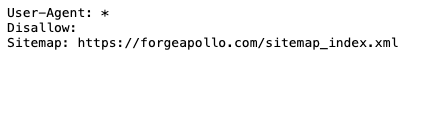
Check to make sure that nothing says “Disallow” related to AI or any common AI platforms, like ChatGPT. If your file includes “Content-Signal,” make sure anything related to AI says “yes.”
If your robots.txt file is blocking AI crawlers, you can work with a website developer, like Forge Apollo, to adjust these settings.
CDN & Plugin Settings
A content delivery network (CDN) is a tool that helps improve website performance and security by caching content close to end users. Some CDNs have settings that allow site owners to block AI crawlers, and some of these may be turned on by default.
For example, our go-to CDN, Cloudflare, turned AI-blocking settings on by default between July 2025 and September 15, 2026. They no longer do so, but during this time we had to ensure we turned off those settings for any new sites.
Some SEO plugins, like Yoast, also include settings that can block AI crawlers when turned on. These are less likely to be on by default, but it’s still worth checking in case someone else working on your site enabled them.
Explore your settings across your CDN and SEO plugins on your website to ensure nothing is configured to block AI crawlers.
Step 2: Do a Content Audit
After you’ve confirmed that AI crawlers can access your site, you’re going to evaluate the content they find when they get there.
Here are the areas we consider in an AEO content audit.
Informational Accuracy
- Does your content reflect your current products and services?
- Is all of the information within your content correct?
Expertise
- Does your content include evidence of first-hand expertise, or does it read like anyone with access to Google could’ve written it?
Topical Coverage
- Consider the most common questions your customers ask at each stage of their purchase journey.
- Make sure each page of your website answers the relevant questions on that page.
- Don’t silo all your information on a single FAQ page.
Quality
- Is your content easy to read and understand? We recommend staying at or under a 9th-grade reading level, which you can check on the Hemingway Editor.
- Is your content free of grammatical and spelling errors?
- Does your content reflect your brand’s tone of voice?
Freshness
- When was the last time you updated your content? The more recent, the better.
- Plan to update anything that hasn’t been updated in 6 months.
Step 3: Check Your Content’s Technical Structure
Finally, when an AI crawler visits your website and crawls your content, several structural elements make it easier to understand.
We evaluate our clients’ content for the following technical factors:
- Heading tags in proper hierarchical order
- Bullet points
- Tables
- Schema markup
- Alt text on images
- Captions or transcripts with videos
- Limited JavaScript (most AI crawlers don’t render it, so content within JavaScript is invisible to them)
Get a Professional AEO Website Audit
Optimizing your website for AI search is challenging if you’re not familiar with technical website development. We’re here to help. As a leading web development company in the Philadelphia area, Forge Apollo stays on top of AI website optimization best practices so that you don’t have to. Contact us today to explore pricing.